
Lightspeed X-Series - Inventory Count User Guide

Table of Contents
Inventory Count
The Inventory Count queue is where all Lightspeed X-Series Inventory Count records are placed once the count is completed.
Inventory Adjustment transaction IDs can be seen here when the inventory count has successfully processed, as shown below:

Below are the list of fields and their descriptions of the Lightspeed X-Series Inventory Count record.
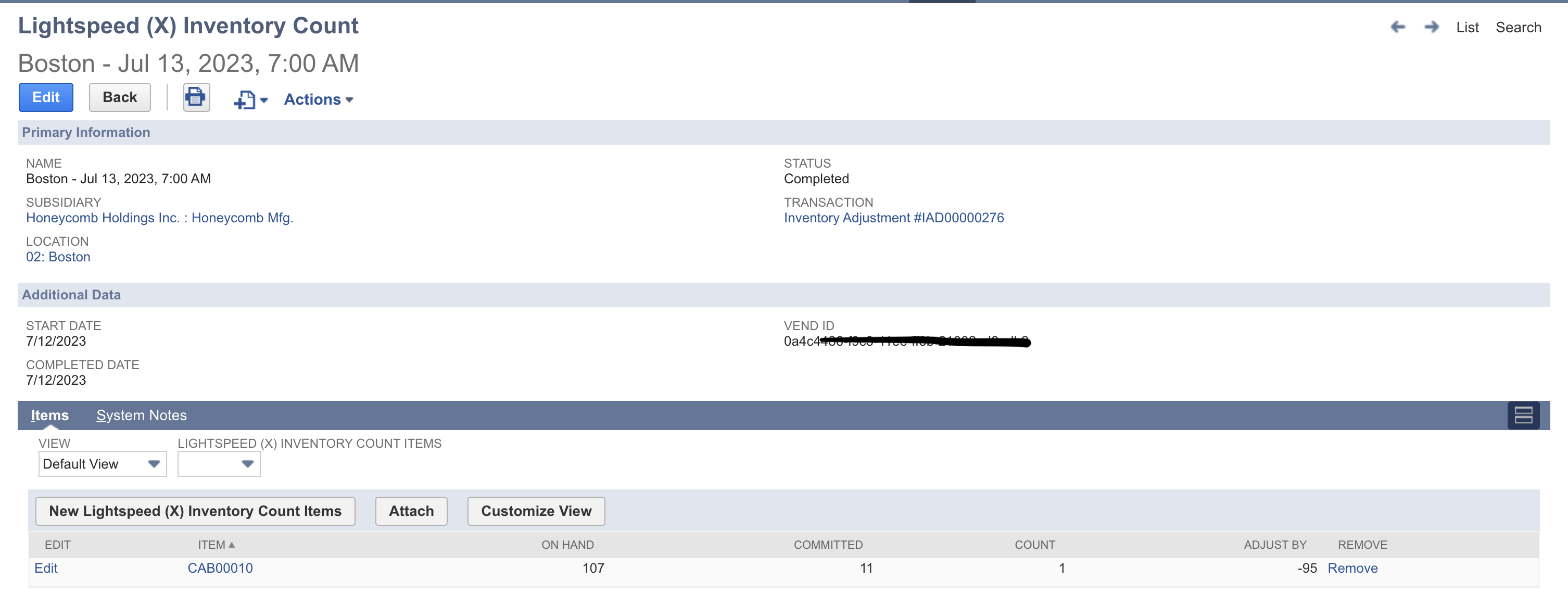
Field Name | Description | Notes |
|---|---|---|
Primary Information | ||
Name | Name of the Lightspeed X-Series Inventory Count record | |
Subsidiary | Subsidiary used in the Inventory Adjustment. | |
Location | Location where quantity should be adjusted to (Adjustment Location) | |
Status | Status of the Lightspeed X-Series Inventory Count while processing | Possible Statuses:
|
Transaction | Inventory Adjustment transaction link after creation | |
Additional Data | ||
Start Date | Consignment Date | |
Completed Date | Consignment Completed Date | |
Vend ID | Lightspeed X-Series Inventory Count ID | |
Lightspeed (X) Inventory Count Items | ||
Item | Item whose quantity is to be adjusted | |
On hand | NetSuite ‘On Hand’ quantity based on location | |
Count | Lightspeed X-Series ‘Consignment Received’ quantity | |
Adjust by | Count - (On hand - Committed) | |
Committed | NetSuite Committed quantity based on location | |
For more information about the Inventory Count Sync, please visit the Inventory Count Sync page.